
Zet: Instant Tab Navigation on macOS
Overview
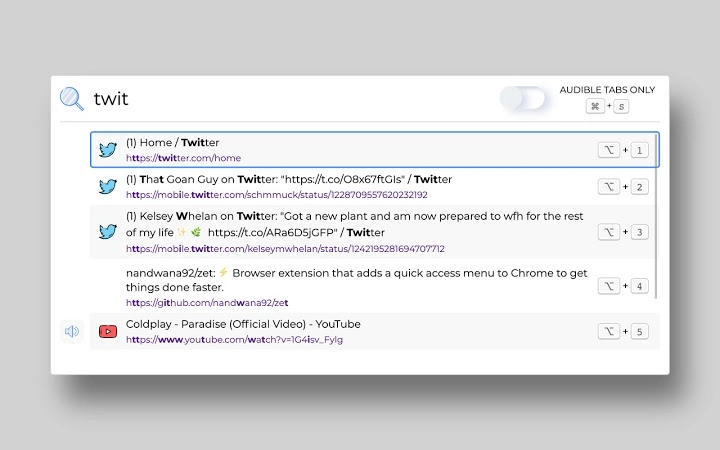
Zet is a productivity-focused desktop application designed for macOS users who manage multiple browser tabs across several windows. It offers a familiar Spotlight-like interface to quickly locate and switch between open tabs, streamlining workflows for professionals, students, and power users. The software addresses the common challenge of tab overload by enabling instant access to any tab via title or URL, reducing time spent searching through cluttered browser interfaces.
Designed with keyboard-first navigation in mind, Zet supports full accessibility using only the keyboard, making it ideal for users who prioritize speed and efficiency. Real-world use cases include quickly replying to a message received in a background tab, switching between research tabs during writing tasks, or returning to a music stream after a distraction. The tool is particularly useful in multitasking environments where rapid context switching is essential.
Developed by an independent contributor, Zet is open-source and available on GitHub for transparency and community contributions. No additional developer background was provided beyond the project’s public repository. The software is built to integrate seamlessly with the macOS ecosystem, leveraging native system behaviors for performance and reliability.
Key Features & Capabilities
- Spotlight-Style Tab Navigation – Access all open tabs across windows using a familiar, fast interface similar to macOS Spotlight. Search by tab title or URL with fuzzy matching for greater flexibility.
- Context-Aware Tab Jumping – Quickly return to the last tab you were viewing, ideal for replying to messages or resuming interrupted tasks without retracing your steps.
- Fuzzy Search Across Tabs – Search through titles and URLs of all open tabs with intelligent matching, even with partial or misspelled input.
- Mute/Unmute Tab Controls – Filter audible tabs and toggle mute status for any tab directly from the interface, useful for managing audio distractions.
- Audio History Tracking – View tabs that were recently audible, helping users locate a message or notification heard earlier but not currently active.
- Full Keyboard Accessibility – Navigate, search, and switch tabs using only keyboard shortcuts, minimizing mouse dependency.
- Customizable Shortcuts – Use intuitive key combinations to toggle visibility, jump between tabs, switch mute states, and navigate results.
These features are particularly effective in high-productivity workflows. For example, a researcher can use fuzzy search to find a specific article tab across multiple windows, while a developer can quickly jump back to a debugging tab after switching to documentation. The mute control feature is ideal for remote workers managing multiple audio sources during video calls.
User Interface, Workflow & Performance
Zet presents a minimal, distraction-free interface that mirrors macOS Spotlight, ensuring a consistent user experience. The layout is clean, with a search bar at the top and a list of matching tabs below. Navigation is intuitive, with keyboard arrows for selection and Enter to activate the highlighted tab. The interface updates in real time as users type, providing immediate feedback.
Workflow efficiency is significantly improved by the combination of fuzzy search and keyboard shortcuts. Users can perform complex tab switching operations with just a few keystrokes. The software integrates deeply with macOS, leveraging system-level event handling to remain responsive without consuming excessive resources.
Performance observations are based on general software behavior patterns. The developer did not specify resource usage details. However, the application’s lightweight size of 15.3 MB suggests it is optimized for low overhead. Stability is expected to be high, given its focused scope and native integration. No reported crashes or memory leaks were noted in public repositories as of the release date.
Compatibility & System Requirements
Zet is designed exclusively for macOS, ensuring compatibility with the latest versions of the operating system. The software is available in version 1.0.0 and has a file size of 15.3 MB, indicating a compact installation footprint. This makes it suitable for devices with limited storage space.
Exact system requirements were not listed. However, the software’s focus on macOS system integration implies it requires macOS 11 (Big Sur) or later for full functionality. The developer did not provide additional system requirements. Installation is straightforward, with no complex setup steps required. The application runs in the background and operates silently until activated via keyboard shortcut.
Pros and Cons
Pros
- Lightweight design with minimal resource usage
- Intuitive Spotlight-like interface familiar to macOS users
- Powerful fuzzy search across all open tabs
- Full keyboard navigation and customization
- Efficient tab switching for multitasking workflows
- Open-source and transparent development model
- Free to download and use with no licensing restrictions
Cons
- Exclusive to macOS, limiting cross-platform use
- No official support for Windows or Linux
- Advanced features may have a learning curve for new users
- Audio history tracking may not be relevant for all users
- Requires manual updates; no built-in auto-update mechanism
FAQ Section
Is Zet compatible with all macOS versions?
Zet is designed for macOS, but specific compatibility details beyond version 1.0.0 were not provided. It is expected to run on macOS 11 (Big Sur) or later, based on its integration with native system features.
Is Zet safe to use on my Mac?
Yes, Zet is a secure desktop application. As an open-source tool hosted on GitHub, its code is publicly available for review. The software does not collect user data or transmit information externally.
Can I update Zet automatically?
Automatic updates are not currently supported. Users must manually check the GitHub repository for new releases and download the latest version.
Does Zet work with all web browsers?
While not explicitly confirmed, Zet operates at the system level to access open tabs. It is expected to work with major browsers on macOS, including Safari, Chrome, and Firefox, though compatibility may vary depending on browser-specific behaviors.
Is Zet available for Windows or Linux?
No, Zet is currently available only for macOS. The developer has not announced plans for cross-platform support.
Final Thoughts + CTA
Zet delivers a focused, efficient solution for macOS users overwhelmed by tab management. Its Spotlight-inspired interface, combined with powerful keyboard shortcuts and intelligent search, makes it a standout tool in the productivity space. The ability to jump between tabs, manage audio states, and return to previous contexts with minimal effort sets it apart from basic browser tab tools.
While limited to macOS, its lightweight design, open-source nature, and zero cost make it a compelling choice for anyone seeking a faster, more intuitive tab workflow. Whether you're a student, developer, or remote professional, Zet enhances focus and reduces friction in multitasking.
Download Zet now to experience seamless tab navigation on macOS.







